
Tabla de Contenido
Verifique os vizinhos OSPF
Se você configurou o OSPFv2 de área única, precisará verificar suas configurações. Este tópico detalha os muitos comandos que você pode usar para verificar o OSPF.
Como você sabe, os dois comandos a seguir são particularmente úteis para verificar o roteamento:
- show ip interface brief – Isso verifica se as interfaces desejadas estão ativas com o endereçamento IP correto.
- show ip route – verifica se a tabela de roteamento contém todas as rotas esperadas.
Comandos adicionais para determinar se o OSPF está operando conforme o esperado incluem o seguinte:
- show ip ospf neighbor
- show ip protocols
- show ip ospf
- show ip ospf interface
A figura mostra a topologia de referência OSPF usada para demonstrar esses comandos.
Topologia de Referência OSPFv2
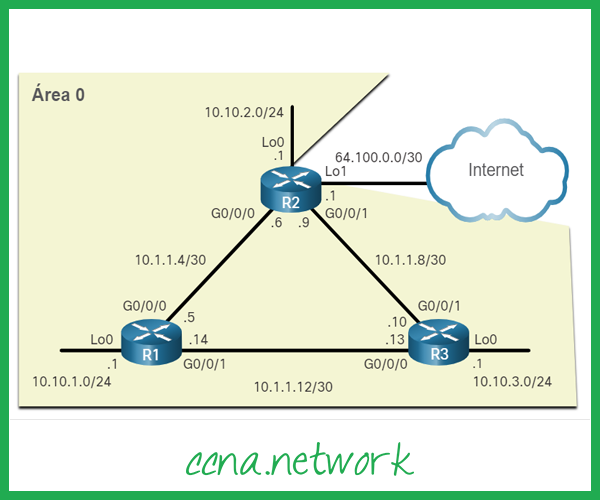
Use o comando show ip ospf neighbor para verificar se o roteador formou uma adjacência com seus roteadores vizinhos. Se a ID do roteador vizinho não for exibida ou se não for exibida como estando em um estado FULL, os dois roteadores não formaram uma adjacência OSPFv2.
Se dois roteadores não estabelecerem adjacência, as informações de link state não serão trocadas. LSDBs incompletos podem causar árvores SPF e tabelas de roteamento imprecisas. As rotas para as redes de destino podem não existir ou podem não ser o caminho ideal.
Nota: Um roteador não DR ou BDR que tem um relacionamento vizinho com outro roteador não DR ou BDR exibirá uma adjacência bidirecional em vez de completa.
A seguinte saída de comando exibe a tabela vizinha de R1.
R1# show ip ospf neighbor
Neighbor ID     Pri   State           Dead Time   Address         Interface
3.3.3.3           0   FULL/  -        00:00:19    10.1.1.13       GigabitEthernet0/0/1
2.2.2.2           0   FULL/  -        00:00:18    10.1.1.6        GigabitEthernet0/0/0
R1#
Para cada vizinho, este comando exibe o seguinte:
- ID do vizinho – Esta é a ID do roteador do roteador vizinho.
- Pri – Esta é a prioridade OSPFv2 da interface. Este valor é usado na eleição de DR e BDR.
- Estado – Este é o estado OSPFv2 da interface. O estado FULL significa que o roteador e seu vizinho têm LSDBs OSPFv2 idênticos. Em redes multiacesso, como Ethernet, dois roteadores adjacentes podem ter seus estados exibidos como 2WAY. O traço indica que nenhum DR ou BDR é necessário devido ao tipo de rede.
- Dead Time – Esta é a quantidade de tempo restante que o roteador espera para receber um pacote Hello OSPFv2 do vizinho antes de declarar o vizinho inativo. Este valor é redefinido quando a interface recebe um pacote Hello.
- Endereço – Este é o endereço IPv4 da interface do vizinho ao qual este roteador está conectado diretamente.
- Interface – Esta é a interface na qual este roteador formou adjacência com o vizinho.
Dois roteadores não podem formar uma adjacência OSPFv2 se ocorrer o seguinte:
- As máscaras de sub-rede não correspondem, fazendo com que os roteadores estejam em redes separadas.
- Os temporizadores OSPFv2 Hello ou Dead não correspondem.
- Os tipos de rede OSPFv2 não correspondem.
- Há um comando de rede OSPFv2 ausente ou incorreto.
Verifique as configurações do protocolo OSPF
O comando show ip protocols é uma maneira rápida de verificar informações vitais de configuração do OSPF, conforme mostrado na seguinte saída do comando. Isso inclui o ID do processo OSPFv2, o ID do roteador, interfaces explicitamente configuradas para anunciar rotas OSPF, os vizinhos dos quais o roteador está recebendo atualizações e a distância administrativa padrão, que é 110 para OSPF.
R1# show ip protocols
*** IP Routing is NSF aware ***
(output omitted)
Routing Protocol is "ospf 10"
  Outgoing update filter list for all interfaces is not set
  Incoming update filter list for all interfaces is not set
  Router ID 1.1.1.1
  Number of areas in this router is 1. 1 normal 0 stub 0 nssa
  Maximum path: 4
  Routing for Networks:
  Routing on Interfaces Configured Explicitly (Area 0):
    Loopback0
    GigabitEthernet0/0/1
    GigabitEthernet0/0/0
  Routing Information Sources:
    Gateway         Distance      Last Update
    3.3.3.3              110      00:09:30
    2.2.2.2              110      00:09:58
  Distance: (default is 110)
R1#
Verifique as informações do processo OSPF
O comando show ip ospf também pode ser usado para examinar o ID do processo OSPFv2 e o ID do roteador, conforme mostrado na saída do comando a seguir. Este comando exibe as informações da área OSPFv2 e a última vez que o algoritmo SPF foi executado.
R1# show ip ospf
 Routing Process "ospf 10" with ID 1.1.1.1
 Start time: 00:01:47.390, Time elapsed: 00:12:32.320
 Supports only single TOS(TOS0) routes
 Supports opaque LSA
 Supports Link-local Signaling (LLS)
 Supports area transit capability
 Supports NSSA (compatible with RFC 3101)
 Supports Database Exchange Summary List Optimization (RFC 5243)
 Event-log enabled, Maximum number of events: 1000, Mode: cyclic
 Router is not originating router-LSAs with maximum metric
 Initial SPF schedule delay 5000 msecs
 Minimum hold time between two consecutive SPFs 10000 msecs
 Maximum wait time between two consecutive SPFs 10000 msecs
 Incremental-SPF disabled
 Minimum LSA interval 5 secs
 Minimum LSA arrival 1000 msecs
 LSA group pacing timer 240 secs
 Interface flood pacing timer 33 msecs
 Retransmission pacing timer 66 msecs
 EXCHANGE/LOADING adjacency limit: initial 300, process maximum 300
 Number of external LSA 1. Checksum Sum 0x00A1FF
 Number of opaque AS LSA 0. Checksum Sum 0x000000
 Number of DCbitless external and opaque AS LSA 0
 Number of DoNotAge external and opaque AS LSA 0
 Number of areas in this router is 1. 1 normal 0 stub 0 nssa
 Number of areas transit capable is 0
 External flood list length 0
 IETF NSF helper support enabled
 Cisco NSF helper support enabled
 Reference bandwidth unit is 10000 mbps
    Area BACKBONE(0)
        Number of interfaces in this area is 3
	Area has no authentication
	SPF algorithm last executed 00:11:31.231 ago
	SPF algorithm executed 4 times
	Area ranges are
	Number of LSA 3. Checksum Sum 0x00E77E
	Number of opaque link LSA 0. Checksum Sum 0x000000
	Number of DCbitless LSA 0
	Number of indication LSA 0
	Number of DoNotAge LSA 0
	Flood list length 0
R1#
Verifique as configurações da interface OSPF
O comando show ip ospf interface fornece uma lista detalhada para cada interface habilitada para OSPFv2. Especifique uma interface para exibir as configurações apenas dessa interface, conforme mostrado na saída a seguir para Gigabit Ethernet 0/0/0. Este comando mostra o ID do processo, o ID do roteador local, o tipo de rede, custo OSPF, informações de DR e BDR em links multiacesso (não mostrados) e vizinhos adjacentes.
R1# show ip ospf interface GigabitEthernet 0/0/0
GigabitEthernet0/0/0 is up, line protocol is up
  Internet Address 10.1.1.5/30, Area 0, Attached via Interface Enable
  Process ID 10, Router ID 1.1.1.1, Network Type POINT_TO_POINT, Cost: 10
  Topology-MTID    Cost    Disabled    Shutdown      Topology Name
        0           10        no          no            Base
  Enabled by interface config, including secondary ip addresses
  Transmit Delay is 1 sec, State POINT_TO_POINT
  Timer intervals configured, Hello 5, Dead 20, Wait 20, Retransmit 5
    oob-resync timeout 40
    Hello due in 00:00:01
  Supports Link-local Signaling (LLS)
  Cisco NSF helper support enabled
  IETF NSF helper support enabled
  Index 1/2/2, flood queue length 0
  Next 0x0(0)/0x0(0)/0x0(0)
  Last flood scan length is 1, maximum is 1
  Last flood scan time is 0 msec, maximum is 0 msec
  Neighbor Count is 1, Adjacent neighbor count is 1
    Adjacent with neighbor 2.2.2.2
  Suppress hello for 0 neighbor(s)
R1#
Para obter um resumo rápido das interfaces habilitadas para OSPFv2, use o comando show ip ospf interface brief, conforme mostrado na seguinte saída de comando. Este comando é útil para ver informações importantes, incluindo o seguinte:
- As interfaces estão participando do OSPF
- Redes que estão sendo anunciadas (endereço IP / máscara)
- Custo de cada link
- Estado da rede
- Número de vizinhos em cada link
R1# show ip ospf interface brief
Interface    PID   Area            IP Address/Mask    Cost  State Nbrs F/C
Lo0          10    0               10.10.1.1/24       10    P2P   0/0
Gi0/0/1      10    0               10.1.1.14/30       30    P2P   1/1
Gi0/0/0      10    0               10.1.1.5/30        10    P2P   1/1
R1#
Verificador de sintaxe – Verificar OSPFv2 de área única
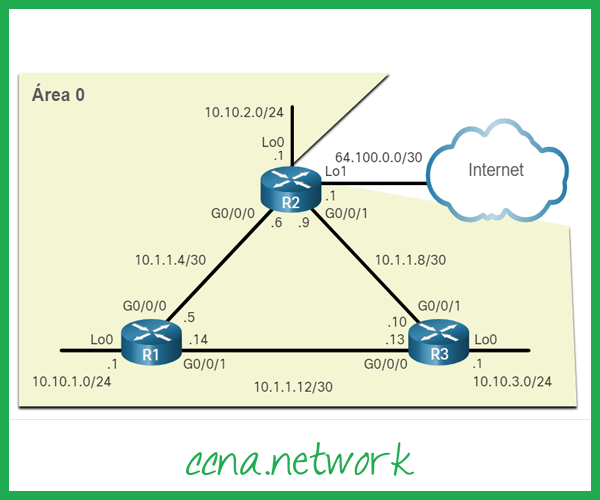
Use o Verificador de sintaxe para verificar a configuração OSPFv2 de área única em R2 e R3.
Topologia de referência OSPF
Exiba um resumo do status das interfaces IPv4 em R2.
R2#show ip interface brief
Interface              IP-Address      OK? Method Status                Protocol
GigabitEthernet0/0/0   10.1.1.6        YES NVRAM  up                    up
GigabitEthernet0/0/1   10.1.1.9        YES NVRAM  up                    up
Serial0/1/0            unassigned      YES NVRAM  administratively down down
Serial0/1/1            unassigned      YES NVRAM  administratively down down
GigabitEthernet0       unassigned      YES NVRAM  administratively down down
Loopback0              10.10.2.1       YES NVRAM  up                    up
Loopback1              64.100.0.1      YES NVRAM  up                    up
R2#
Exiba as rotas OSPF instaladas na tabela de roteamento em R2.
R2#show ip route ospf
Codes: L - local, C - connected, S - static, R - RIP, M - mobile, B - BGP
       D - EIGRP, EX - EIGRP external, O - OSPF, IA - OSPF inter area
       N1 - OSPF NSSA external type 1, N2 - OSPF NSSA external type 2
       E1 - OSPF external type 1, E2 - OSPF external type 2
       i - IS-IS, su - IS-IS summary, L1 - IS-IS level-1, L2 - IS-IS level-2
       ia - IS-IS inter area, \* - candidate default, U - per-user static route
       o - ODR, P - periodic downloaded static route, H - NHRP, l - LISP
       a - application route
       + - replicated route, % - next hop override
Gateway of last resort is 0.0.0.0 to network 0.0.0.0
      10.0.0.0/8 is variably subnetted, 9 subnets, 3 masks
O        10.1.1.12/30 \[110/40\] via 10.1.1.10, 00:45:28, GigabitEthernet0/0/1
                      \[110/40\] via 10.1.1.5, 00:45:49, GigabitEthernet0/0/0
O        10.10.1.0/24 \[110/20\] via 10.1.1.5, 00:45:49, GigabitEthernet0/0/0
O        10.10.3.0/24 \[110/20\] via 10.1.1.10, 00:45:28, GigabitEthernet0/0/1
R2#
Exiba a tabela de vizinhos OSPF para R2.
R2#show ip ospf neighbor
Neighbor ID     Pri   State           Dead Time   Address         Interface
3.3.3.3           0   FULL/  -        00:00:16    10.1.1.10       GigabitEthernet0/0/1
1.1.1.1           0   FULL/  -        00:00:19    10.1.1.5        GigabitEthernet0/0/0
R2#
Verifique as configurações de protocolo em R2.
R2#show ip protocols
\*\*\* IP Routing is NSF aware \*\*\*
(output omitted)
Routing Protocol is "ospf 10"
  Outgoing update filter list for all interfaces is not set
  Incoming update filter list for all interfaces is not set
  Router ID 2.2.2.2
  It is an autonomous system boundary router
 Redistributing External Routes from,
  Number of areas in this router is 1. 1 normal 0 stub 0 nssa
  Maximum path: 4
  Routing for Networks:
  Routing on Interfaces Configured Explicitly (Area 0):
    Loopback0
    GigabitEthernet0/0/1
    GigabitEthernet0/0/0
  Routing Information Sources:
    Gateway         Distance      Last Update
    3.3.3.3              110      00:46:14
    1.1.1.1              110      00:46:36
  Distance: (default is 110)
R2#
Verifique o processo OSPF em R2.
R2#show ip ospf
Routing Process "ospf 10" with ID 2.2.2.2
 Start time: 00:01:54.811, Time elapsed: 00:48:04.766
 Supports only single TOS(TOS0) routes
 Supports opaque LSA
 Supports Link-local Signaling (LLS)
 Supports area transit capability
 Supports NSSA (compatible with RFC 3101)
 Event-log enabled, Maximum number of events: 1000, Mode: cyclic
 It is an autonomous system boundary router
 Redistributing External Routes from,
 Router is not originating router-LSAs with maximum metric
 Initial SPF schedule delay 5000 msecs
 Minimum hold time between two consecutive SPFs 10000 msecs
 Maximum wait time between two consecutive SPFs 10000 msecs
 Incremental-SPF disabled
 Minimum LSA interval 5 secs
 Minimum LSA arrival 1000 msecs
 LSA group pacing timer 240 secs
 Interface flood pacing timer 33 msecs
 Retransmission pacing timer 66 msecs
 Number of external LSA 1. Checksum Sum 0x009F01
 Number of opaque AS LSA 0. Checksum Sum 0x000000
 Number of DCbitless external and opaque AS LSA 0
 Number of DoNotAge external and opaque AS LSA 0
 Number of areas in this router is 1. 1 normal 0 stub 0 nssa
 Number of areas transit capable is 0
 External flood list length 0
 IETF NSF helper support enabled
 Cisco NSF helper support enabled
 Reference bandwidth unit is 10000 mbps
    Area BACKBONE(0)
        Number of interfaces in this area is 3
	Area has no authentication
	SPF algorithm last executed 00:47:04.655 ago
	SPF algorithm executed 5 times
	Area ranges are
	Number of LSA 3. Checksum Sum 0x00E181
	Number of opaque link LSA 0. Checksum Sum 0x000000
	Number of DCbitless LSA 0
	Number of indication LSA 0
	Number of DoNotAge LSA 0
	Flood list length 0
R2#
Use o nome da interface g0/0/0 para verificar as configurações da interface OSPF em R2.
R2#show ip ospf interface g0/0/0
GigabitEthernet0/0/0 is up, line protocol is up
  Internet Address 10.1.1.6/30, Area 0, Attached via Interface Enable
  Process ID 10, Router ID 2.2.2.2, Network Type POINT\_TO\_POINT, Cost: 10
  Topology-MTID    Cost    Disabled    Shutdown      Topology Name
        0           10        no          no            Base
  Enabled by interface config, including secondary ip addresses
  Transmit Delay is 1 sec, State POINT\_TO\_POINT
  Timer intervals configured, Hello 5, Dead 20, Wait 20, Retransmit 5
    oob-resync timeout 40
    Hello due in 00:00:02
  Supports Link-local Signaling (LLS)
  Cisco NSF helper support enabled
  IETF NSF helper support enabled
  Index 2/2, flood queue length 0
  Next 0x0(0)/0x0(0)
  Last flood scan length is 1, maximum is 1
  Last flood scan time is 0 msec, maximum is 1 msec
  Neighbor Count is 1, Adjacent neighbor count is 1
    Adjacent with neighbor 1.1.1.1
  Suppress hello for 0 neighbor(s)
R2#
Exibir informações resumidas para todas as interfaces OSPF em R2.
R2#show ip ospf interface brief
Interface    PID   Area            IP Address/Mask    Cost  State Nbrs F/C
Lo0          10    0               10.10.2.1/24       10    P2P   0/0
Gi0/0/1      10    0               10.1.1.9/30        10    P2P   1/1
Gi0/0/0      10    0               10.1.1.6/30        10    P2P   1/1
R2#
Você agora está conectado ao R3. Exibe um resumo do status das interfaces IPv4 em R3.
R3#show ip interface brief
Interface              IP-Address      OK? Method Status                Protocol
GigabitEthernet0/0/0   10.1.1.13       YES NVRAM  up                    up
GigabitEthernet0/0/1   10.1.1.10       YES NVRAM  up                    up
Serial0/1/0            unassigned      YES NVRAM  administratively down down
Serial0/1/1            unassigned      YES NVRAM  administratively down down
GigabitEthernet0       unassigned      YES NVRAM  administratively down down
Loopback0              10.10.3.1       YES NVRAM  up                    up
R3#
Exiba as rotas OSPF instaladas na tabela de roteamento em R3.
R3#show ip route ospf
Codes: L - local, C - connected, S - static, R - RIP, M - mobile, B - BGP
       D - EIGRP, EX - EIGRP external, O - OSPF, IA - OSPF inter area
       N1 - OSPF NSSA external type 1, N2 - OSPF NSSA external type 2
       E1 - OSPF external type 1, E2 - OSPF external type 2
       i - IS-IS, su - IS-IS summary, L1 - IS-IS level-1, L2 - IS-IS level-2
       ia - IS-IS inter area, \* - candidate default, U - per-user static route
       o - ODR, P - periodic downloaded static route, H - NHRP, l - LISP
       a - application route
       + - replicated route, % - next hop override, p - overrides from PfR
Gateway of last resort is 10.1.1.9 to network 0.0.0.0
O\*E2  0.0.0.0/0 \[110/1\] via 10.1.1.9, 00:49:56, GigabitEthernet0/0/1
      10.0.0.0/8 is variably subnetted, 9 subnets, 3 masks
O        10.1.1.4/30 \[110/20\] via 10.1.1.9, 00:49:56, GigabitEthernet0/0/1
O        10.10.1.0/24 \[110/30\] via 10.1.1.9, 00:49:56, GigabitEthernet0/0/1
O        10.10.2.0/24 \[110/20\] via 10.1.1.9, 00:49:56, GigabitEthernet0/0/1
R3#
Exiba a tabela de vizinhos para R3.
R3#show ip ospf neighbor
Neighbor ID     Pri   State           Dead Time   Address         Interface
2.2.2.2           0   FULL/  -        00:00:18    10.1.1.9        GigabitEthernet0/0/1
1.1.1.1           0   FULL/  -        00:00:19    10.1.1.14       GigabitEthernet0/0/0
R3#
Verifique as configurações de protocolo em R3.
R3#show ip protocols
\*\*\* IP Routing is NSF aware \*\*\*
(output omitted)
Routing Protocol is "ospf 10"
  Outgoing update filter list for all interfaces is not set
  Incoming update filter list for all interfaces is not set
  Router ID 3.3.3.3
  Number of areas in this router is 1. 1 normal 0 stub 0 nssa
  Maximum path: 4
  Routing for Networks:
  Routing on Interfaces Configured Explicitly (Area 0):
    Loopback0
    GigabitEthernet0/0/1
    GigabitEthernet0/0/0
  Routing Information Sources:
    Gateway         Distance      Last Update
    1.1.1.1              110      00:50:44
    2.2.2.2              110      00:50:44
  Distance: (default is 110)
R3#
Verifique o processo OSPF em R3.
R3#show ip ospf
Routing Process "ospf 10" with ID 3.3.3.3
 Start time: 00:01:38.093, Time elapsed: 00:52:05.897
 Supports only single TOS(TOS0) routes
 Supports opaque LSA
 Supports Link-local Signaling (LLS)
 Supports area transit capability
 Supports NSSA (compatible with RFC 3101)
 Supports Database Exchange Summary List Optimization (RFC 5243)
 Event-log enabled, Maximum number of events: 1000, Mode: cyclic
 Router is not originating router-LSAs with maximum metric
 Initial SPF schedule delay 5000 msecs
 Minimum hold time between two consecutive SPFs 10000 msecs
 Maximum wait time between two consecutive SPFs 10000 msecs
 Incremental-SPF disabled
 Minimum LSA interval 5 secs
 Minimum LSA arrival 1000 msecs
 LSA group pacing timer 240 secs
 Interface flood pacing timer 33 msecs
 Retransmission pacing timer 66 msecs
 EXCHANGE/LOADING adjacency limit: initial 300, process maximum 300
 Number of external LSA 1. Checksum Sum 0x009F01
 Number of opaque AS LSA 0. Checksum Sum 0x000000
 Number of DCbitless external and opaque AS LSA 0
 Number of DoNotAge external and opaque AS LSA 0
 Number of areas in this router is 1. 1 normal 0 stub 0 nssa
 Number of areas transit capable is 0
 External flood list length 0
 IETF NSF helper support enabled
 Cisco NSF helper support enabled
 Reference bandwidth unit is 10000 mbps
    Area BACKBONE(0)
        Number of interfaces in this area is 3
	Area has no authentication
	SPF algorithm last executed 00:51:04.059 ago
	SPF algorithm executed 4 times
	Area ranges are
	Number of LSA 3. Checksum Sum 0x00E181
	Number of opaque link LSA 0. Checksum Sum 0x000000
	Number of DCbitless LSA 0
	Number of indication LSA 0
	Number of DoNotAge LSA 0
	Flood list length 0
R3#
Use o nome da interface g0/0/0 para verificar as configurações da interface OSPF em R3.
R3#show ip ospf interface g0/0/0
GigabitEthernet0/0/0 is up, line protocol is up
  Internet Address 10.1.1.13/30, Area 0, Attached via Interface Enable
  Process ID 10, Router ID 3.3.3.3, Network Type POINT\_TO\_POINT, Cost: 30
  Topology-MTID    Cost    Disabled    Shutdown      Topology Name
        0           30        no          no            Base
  Enabled by interface config, including secondary ip addresses
  Transmit Delay is 1 sec, State POINT\_TO\_POINT
  Timer intervals configured, Hello 5, Dead 20, Wait 20, Retransmit 5
    oob-resync timeout 40
    Hello due in 00:00:02
  Supports Link-local Signaling (LLS)
  Cisco NSF helper support enabled
  IETF NSF helper support enabled
  Index 1/2/2, flood queue length 0
  Next 0x0(0)/0x0(0)/0x0(0)
  Last flood scan length is 1, maximum is 1
  Last flood scan time is 0 msec, maximum is 0 msec
  Neighbor Count is 1, Adjacent neighbor count is 1
    Adjacent with neighbor 1.1.1.1
  Suppress hello for 0 neighbor(s)
R3#
Exibir informações resumidas para todas as interfaces OSPF em R3.
R3#show ip ospf interface brief
Interface    PID   Area            IP Address/Mask    Cost  State Nbrs F/C
Lo0          10    0               10.10.3.1/24       10    P2P   0/0
Gi0/0/1      10    0               10.1.1.10/30       10    P2P   1/1
Gi0/0/0      10    0               10.1.1.13/30       30    P2P   1/1
R3#
Você verificou com êxito o OSPFv2 de área única em R2 e R3.
Packet Tracer – Verificar OSPFv2 de Área Única
Nesta atividade do Packet Tracer, você usará uma variedade de comandos para verificar a configuração do OSPFv2 de área única.
[button url=”https://www.ccna.network/wp-content/uploads/2021/03/2.6.6-pt.zip” target=”self” style=”default” background=”#2fa614″ color=”#FFFFFF” size=”3″ wide=”no” center=”yes” radius=”auto” icon=”” icon_color=”#FFFFFF” text_shadow=”none” desc=”” download=”” onclick=”” rel=”” title=”” id=”” class=””]BAIXE AQUI[/button]
Pronto para ir! Continue visitando nosso blog do curso de networking, confira todo o conteúdo do CCNA 3 aqui; e você encontrará mais ferramentas e conceitos que o tornarão um profissional de rede.